
Close Menu
My Android News – Android News, Apps & Phone UpdatesMy Android News – Android News, Apps & Phone Updates
    Facebook X (Twitter) Instagram Threads
    Trending
    • How to Clear App Cache on Android Without Losing Data
    • Battery Dying Fast After One UI 9? Don’t Factory Reset Your Galaxy S24 or S25 Yet
    • Google Pixel 7 Pro Review 2026: Camera, Battery, Display, and Performance
    • Your Play Store Now Has a Phone Shop Hidden in the Account Menu
    • 10 Things to Check Before Installing an Android App
    • Motorola Signature 27’s Seven-Year Promise Has a Catch
    • How Much Phone Storage Do You Actually Need on Android?
    • How to Get Better Gaming Performance From Your Android Phone
    Facebook Instagram Pinterest YouTube LinkedIn
    My Android News – Android News, Apps & Phone UpdatesMy Android News – Android News, Apps & Phone Updates
    • Home
    • Android Apps
    • Android Gaming
    • Android How-To
    • Android News
    • Android Phones
    • Android Tips
    • Reviews
    My Android News – Android News, Apps & Phone UpdatesMy Android News – Android News, Apps & Phone Updates
    Home » Battery Dying Fast After One UI 9? Don’t Factory Reset Your Galaxy S24 or S25 Yet
    Android News

    Battery Dying Fast After One UI 9? Don’t Factory Reset Your Galaxy S24 or S25 Yet

    My Android News DeskBy My Android News DeskOctober 23, 2026No Comments2 Mins Read0 Views
    Share Facebook Twitter Pinterest LinkedIn Tumblr Email Copy Link
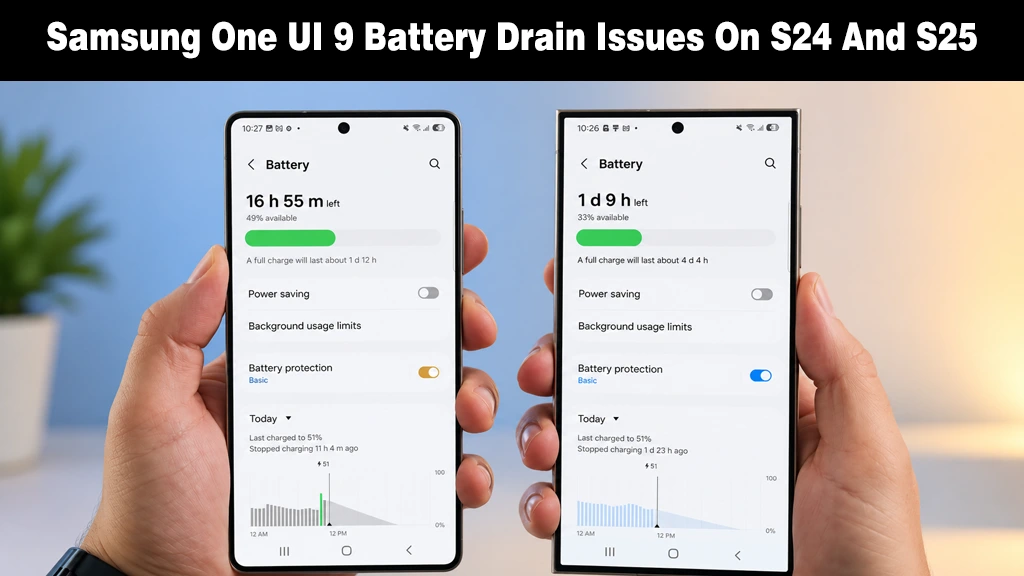
    Two Samsung Galaxy smartphones held side-by-side displaying battery settings and usage status.
    Galaxy S24 and S25 users report rapid battery drain following the One UI 9 update.
    Share
    Facebook Twitter LinkedIn Pinterest Email Copy Link

    Samsung’s Android 17-based One UI 9 update is expanding to more Galaxy S24 and S25 devices, but online user complaints over rapid battery drain are mounting. A closer look at early reports outlines the scope of the issue. 

    What Owners Are Reporting

    One user said their phone died in “just over 5 hours,” though that was under heavy use, according to SammyFans. 

    S24 owners on Reddit describe worse idle drain, while users on Samsung Community are complaining they now charge “3 to 4 times a day.” 
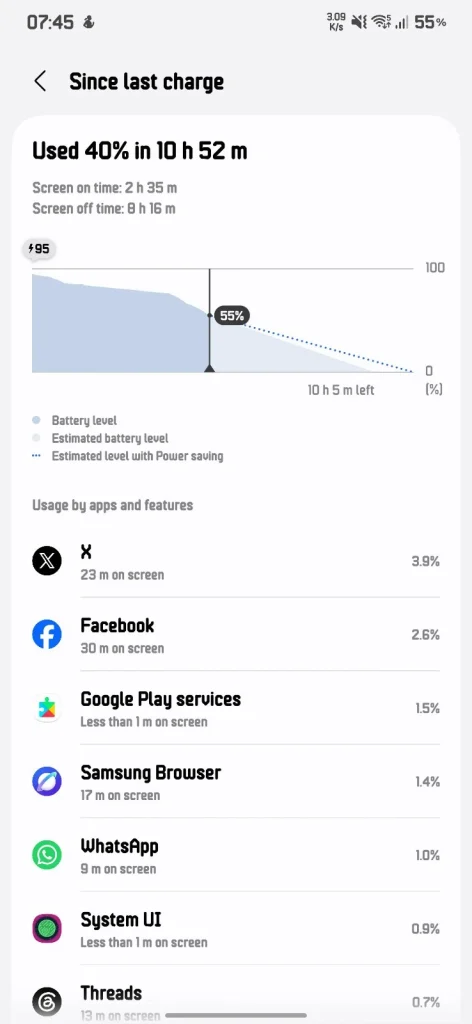
    Reddit Users Reporting Battery Drain
    Screenshot of Reddit Users Reporting Battery Drain / Image Credit: u/u/stealthy_pirate

    Reports also note that an S25 owner says that they found no single app responsible for the drain.

    9to5Google calls this “the oddity and not the norm, so far at least,” and notes the reports aren’t widespread. Neither source found a confirmed cause, and neither documents a Samsung response.

    Why the First Days Can Look Worse

    System upgrades often bring temporary changes in performance. 

    After any major system update, the phone re-optimizes apps and rebuilds caches, which can briefly raise battery use and heat. 

    Apps not yet tuned for the new OS can spike until developers patch them. Location-triggered Bixby Routines may also fire more often. 

    However, none of this is proven on any individual phone.

    A Test Before You Reset

    • Wait two to three days before changing settings, as a Samsung Members India reply suggested.
    • Log your battery percentage each morning and check the usage screen under Device care in Settings.
    • Update any app that looks disproportionate, then watch a full day.
    • Turn off one Bixby Routine at a time, not everything together.

    These steps are editorial advice, not a Samsung procedure.

    If nothing explains the drain, report it through Samsung Members (Support, then Send feedback) with a log file while the drain is happening.

    Treat a factory reset as the last resort, and back up with Smart Switch first because it erases files and apps. 

    Source: Some Galaxy S24, S25 owners say Samsung’s latest update is wrecking battery life

    Add as Preferred on Google Follow on Google News Follow on Flipboard
    Share. Facebook Twitter Pinterest LinkedIn Tumblr Telegram Email Copy Link
    Previous ArticleGoogle Pixel 7 Pro Review 2026: Camera, Battery, Display, and Performance
    Next Article How to Clear App Cache on Android Without Losing Data
    My Android News Desk

      My Android News Desk is the editorial team behind My Android News, covering the latest Android news, app and phone updates, new features, and developments across the Android ecosystem. The team follows official announcements, developer updates, and reliable sources to provide timely and useful information for Android users.

      Related Posts

      Your Play Store Now Has a Phone Shop Hidden in the Account Menu

      October 16, 2026

      Motorola Signature 27’s Seven-Year Promise Has a Catch

      October 15, 2026

      Android 17 Reaches Nothing Phones: Here’s the Date for Yours

      October 13, 2026
      Add A Comment
      Leave A Reply Cancel Reply

      • What Owners Are Reporting
      • Why the First Days Can Look Worse
      • A Test Before You Reset


      Clickable Image

      My Android News brings you the latest Android news, practical guides, app recommendations, phone coverage, gaming coverage, features, tips, and useful insights to help you get more from your Android devices.

      We Tried It

      How to Clear App Cache on Android Without Losing Data

      October 23, 2026

      Battery Dying Fast After One UI 9? Don’t Factory Reset Your Galaxy S24 or S25 Yet

      October 23, 2026

      Google Pixel 7 Pro Review 2026: Camera, Battery, Display, and Performance

      October 20, 2026

      Subscribe to Updates

      Get the latest Android news, practical guides, app updates, and phone coverage delivered to your inbox

      © 2026 MyAndroidNews. All rights reserved - Powered by WebTech Solutions
      • Home
      • About
      • Privacy Policy
      • Contact
      • Editorial Policy
      • Terms & Conditions

      Type above and press Enter to search. Press Esc to cancel.