Close Menu
My Android News – Android News, Apps & Phone UpdatesMy Android News – Android News, Apps & Phone Updates
    Facebook X (Twitter) Instagram Threads
    Trending
    • How to Turn On Dark Mode in Google Maps on Android
    • Android 17 QPR2 Beta 7 Targets the Bug That Drains Your Pixel Overnight
    • Your Old Pixel Can Now Be a Second Camera on WhatsApp, Zoom and Meet Calls
    • Pixel 11 Pro HiLight Feature Could Finally Expand To WhatsApp, Android Canary 2610 Hints
    • How to Delete Google Maps Search and Location History?
    • What Is AppCloud on Android, and Can You Remove It?
    • If You’re Still on a Pixel 6, This Update Notification Might Be Your Last One
    • The Galaxy S27 Ultra Could Charge Faster Without Needing a New Charger
    Facebook Instagram Pinterest YouTube LinkedIn
    My Android News – Android News, Apps & Phone UpdatesMy Android News – Android News, Apps & Phone Updates
    • Home
    • Android Apps
    • Android Gaming
    • Android How-To
    • Android News
    • Android Phones
    • Android Tips
    • Reviews
    My Android News – Android News, Apps & Phone UpdatesMy Android News – Android News, Apps & Phone Updates
    Home » How to Turn On Dark Mode in Google Maps on Android
    Android How-To

    How to Turn On Dark Mode in Google Maps on Android

    Faisal iqbalBy Faisal iqbalOctober 10, 2026No Comments4 Mins Read0 Views
    Share Facebook Twitter Pinterest LinkedIn Tumblr Email Copy Link
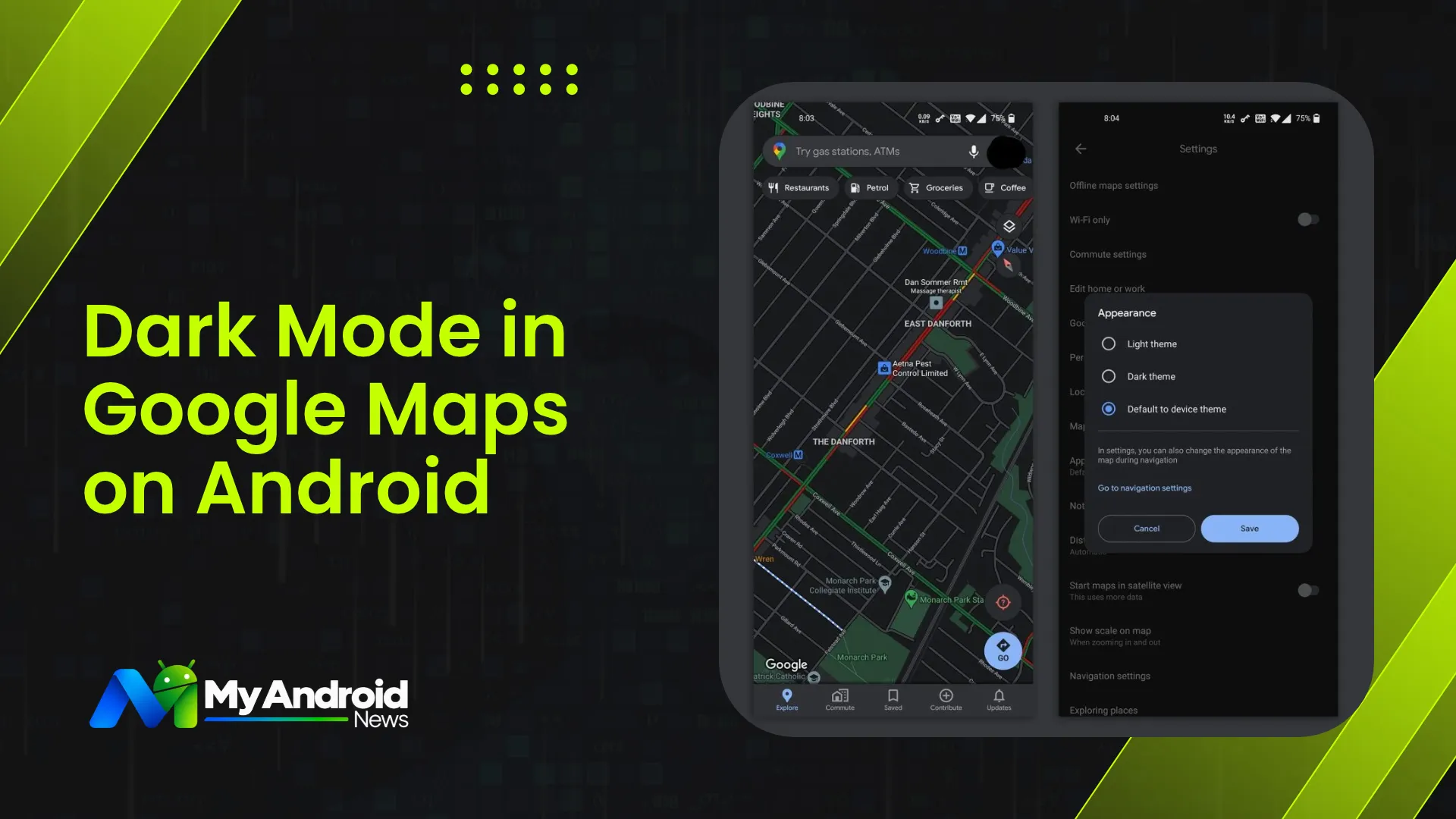
    Google Maps dark mode enabled on an Android phone
    Dark Mode in Google Maps on Android
    Share
    Facebook Twitter LinkedIn Pinterest Email Copy Link

    Dark Mode in Google Maps dims the screen to make navigation easier on the eyes in low-light conditions.

    You can set Maps to always use a dark theme or match your phone’s system theme, with automatic device theme matching supported on Android 10 and newer. You can also customize navigation map colours separately for driving directions.

    Enabling the feature takes just a few taps within the app settings.

    How to Turn On Dark Mode in Google Maps?

    To make Google Maps use dark mode on your Android phone while browsing the map, follow these steps:

    • Open Google Maps and tap your profile picture in the top-right corner.
    • Tap Settings.
    • Now, go to the App and display section.
    • Tap Theme.
    • Select Always in dark theme and tap Save.
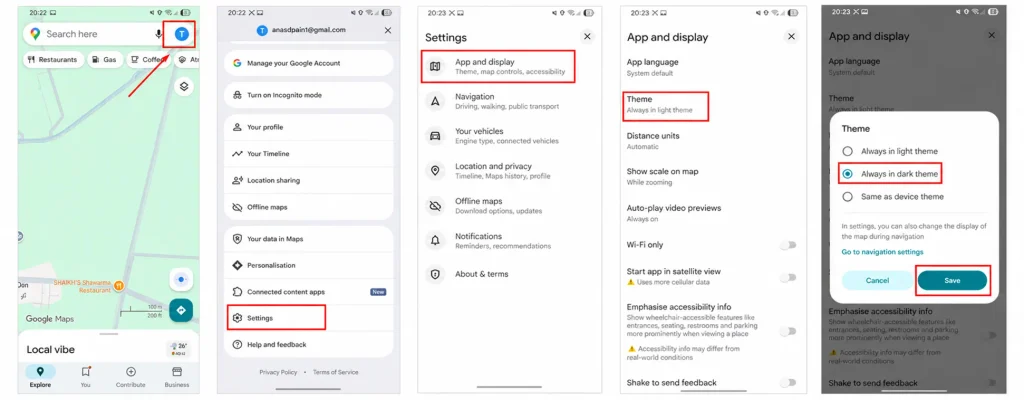
    Enable dark mode on Google Maps
    How to enable dark mode on Google Maps / Image Credit : My Android News Team

    Google Maps will now use the dark theme when you browse the app.

    How to Turn On Dark Mode During Navigation?

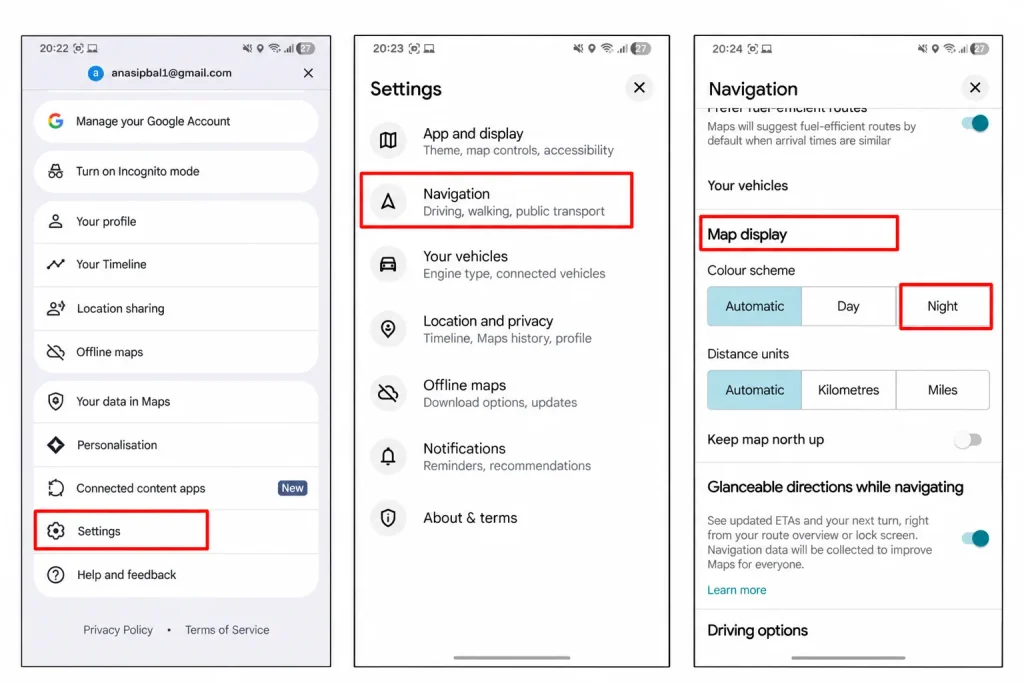
    Standard dark mode doesn’t always apply to driving directions automatically. To keep turn-by-turn maps dark while driving, update your navigation preferences as shown:

    • Open Google Maps, tap your profile picture, and go to Settings.
    • Tap Navigation.
    • Scroll down to Map display.
    • Under Colour scheme, select Night.
    Google Maps Dark Mode in Navigation
    Turning Google Maps Dark Mode in Navigation / Image Credit: My Android News Team

    The Night option keeps the navigation map in dark mode regardless of your phone’s system theme.

    You can also select Automatic if you want Google Maps to follow your Android device’s theme. 

    How to Make Google Maps Follow Android Dark Mode?

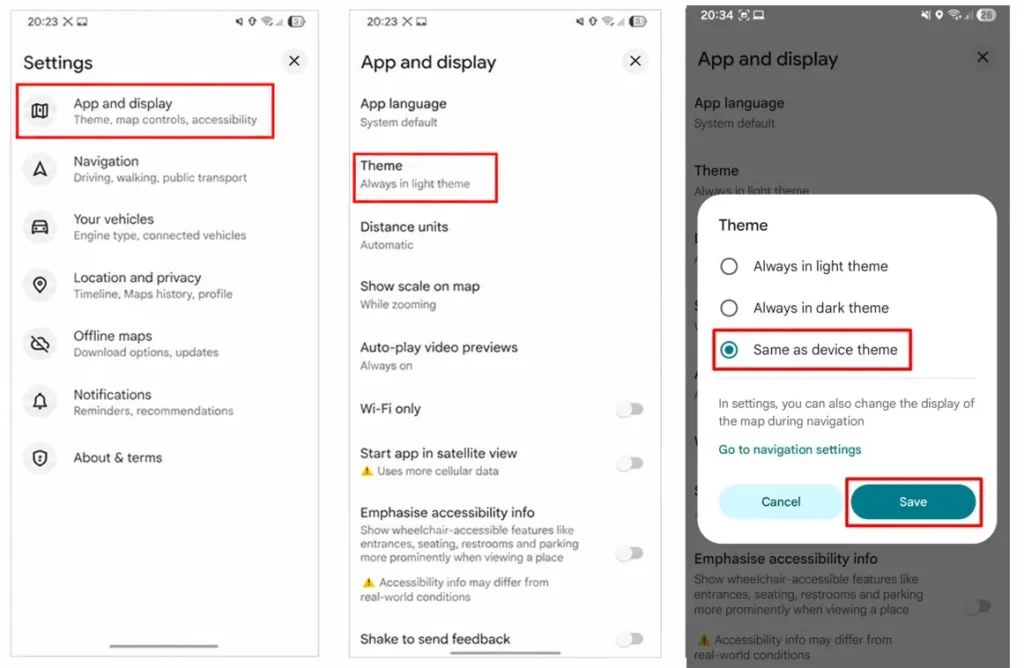
    If you already use dark mode across your Android phone, you can set Google Maps to follow your device’s theme. This means Maps will switch between light and dark mode when you change your phone’s display theme.

    • Open Google Maps on your Android phone.
    • Tap your profile picture or initial in the top-right corner.
    • Now, tap Settings.
    • Tap App and display.
    • Go to Theme.
    • Select Same as device theme.
    • Tap Save.
    Google Maps Theme same as your phone
    Set Google Maps Theme same as your phone / Image Credit: My Android News Team

    You can then control dark mode from your Android phone’s settings. On supported devices, open Settings, tap Display, and turn on Dark theme. 
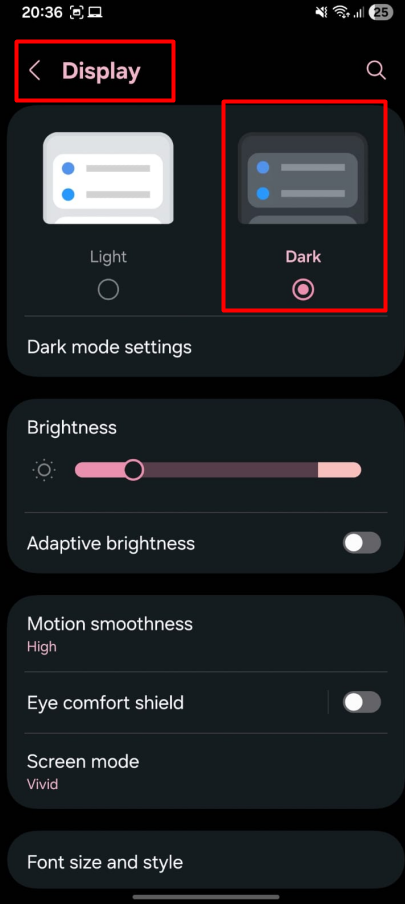
    Turn on Dark theme on Android
    Turn on Dark theme on Android / Image Credit: My Android News Team

    Google Maps will follow the theme selected on your phone.

    Why do People Prefer Dark Mode on Google Maps? 

    People prefer Google Maps Dark Mode primarily to eliminate screen glare and reduce eye strain during night driving. This makes the map details, labels, and turn-by-turn routes easier to read in dim lighting.

    Other than that, the higher contrast helps high-traffic roads and navigation cues stand out far more clearly than on a standard light display.

    Does Dark Mode Save Battery on Android?

    Dark mode saves battery primarily on smartphones with OLED and AMOLED screens, as these displays turn off individual pixels when displaying black or very dark areas, which reduces power consumption.

    The battery savings are usually smaller on LCD displays because the backlight stays on even when the screen displays dark colors.

    Although enabling dark mode helps, actual power savings depend on your screen brightness and usage.

    If your goal is saving battery and dark mode plus reduced usage still aren’t enough, restricting the background app activity can help.

    Customizing your map display takes just a few taps. It instantly makes evening navigation much more comfortable.

    Whether you set a permanent dark theme, match your phone’s system settings, or stick to the Night driving profile, you get a clean view. It is far easier on your eyes and gentler on your battery, too.

    Add as Preferred on Google Follow on Google News Follow on Flipboard
    Share. Facebook Twitter Pinterest LinkedIn Tumblr Telegram Email Copy Link
    Previous ArticleAndroid 17 QPR2 Beta 7 Targets the Bug That Drains Your Pixel Overnight
    Faisal iqbal
    • Website

    Faisal Iqbal is a technology writer with over five years of experience researching and explaining consumer technology. At My Android News, he covers Android phones, apps, reviews, and practical guides, with a focus on helping readers understand how Android products and features work in everyday use.

    Related Posts

    How to Delete Google Maps Search and Location History?

    October 7, 2026

    Your Android Phone Feels Slow? Here’s What’s Usually Behind It

    September 24, 2026

    How to Clear App Cache on Android Without Losing Data

    September 22, 2026
    Add A Comment
    Leave A Reply Cancel Reply

    • How to Turn On Dark Mode in Google Maps?
    • How to Turn On Dark Mode During Navigation?
    • How to Make Google Maps Follow Android Dark Mode?
    • Why do People Prefer Dark Mode on Google Maps? 
    • Does Dark Mode Save Battery on Android?


    Clickable Image

    My Android News brings you the latest Android news, practical guides, app recommendations, phone coverage, gaming coverage, features, tips, and useful insights to help you get more from your Android devices.

    We Tried It

    How to Turn On Dark Mode in Google Maps on Android

    October 10, 2026

    Android 17 QPR2 Beta 7 Targets the Bug That Drains Your Pixel Overnight

    October 10, 2026

    Your Old Pixel Can Now Be a Second Camera on WhatsApp, Zoom and Meet Calls

    October 9, 2026

    Subscribe to Updates

    Get the latest Android news, practical guides, app updates, and phone coverage delivered to your inbox

    © 2026 MyAndroidNews. All rights reserved - Powered by WebTech Solutions
    • Home
    • About
    • Privacy Policy
    • Contact
    • Editorial Policy
    • Terms & Conditions

    Type above and press Enter to search. Press Esc to cancel.