



Continuous use of an Android phone can make it feel slower. There are multiple reasons for that, including having unnecessary apps installed, low storage, or outdated software. As a result:
- Apps take longer to open
- Keyboard lags at times
- Even simple tasks like switching between apps feel less responsive
Anyhow, in this article, I will explain the most common causes that make your Android phone feel slow; and how fixing them can help you get high performance.
Fixing The Causes Behind Your Android Phone Being Slow
Slowdowns usually don’t come from one single problem. They build up gradually from a mix of software clutter, resource limits, and normal wear over time. The most common causes include:
- Your Storage Is Nearly Full
- Too Many Apps Running in the Background
- Accumulated Cache and Temporary Files
- Outdated Software or Pending Updates
- Battery Health Has Degraded
- Too Many Widgets, Live Wallpapers, and Visual Effects
- Malware or Suspicious Apps
- Aging Hardware Reaching Its Limits
Your Storage Is Nearly Full
Android needs a certain amount of free storage to manage background tasks, cache files, and app updates smoothly. When storage runs low, the entire system slows down. This is one of the most common and easiest issues to fix.
How to fix this:
- Go to Settings > Storage to see what’s taking up extra space
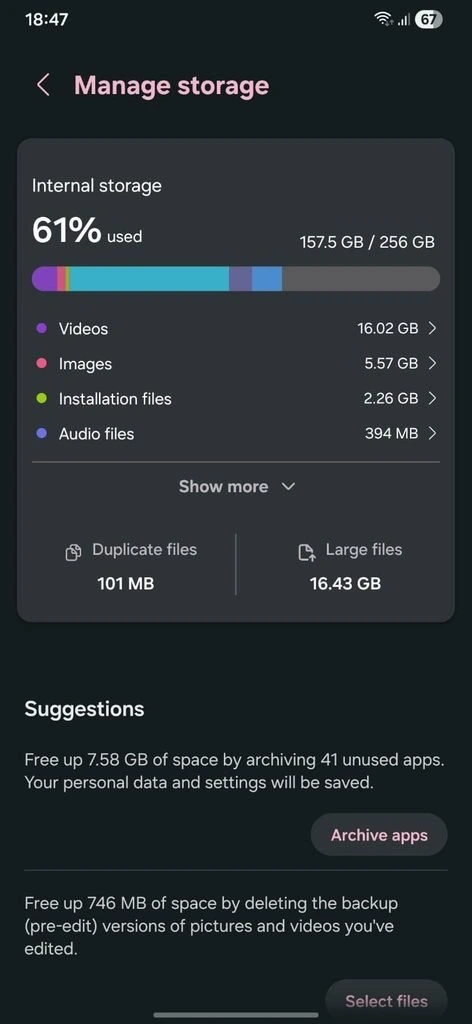
- Delete unused apps, duplicate photos, and large files you no longer need
- Move photos and videos to cloud storage or an external drive
- Use a built-in cleanup tool like Files by Google to clear junk automatically
Too Many Apps Running in the Background
Apps don’t fully shut down even when you swipe away from them. Many keep running quietly in the background, using up RAM and battery, which leaves fewer resources available for ongoing tasks.
How to fix this:
- Check battery and memory usage in Settings to see which apps are the biggest drain
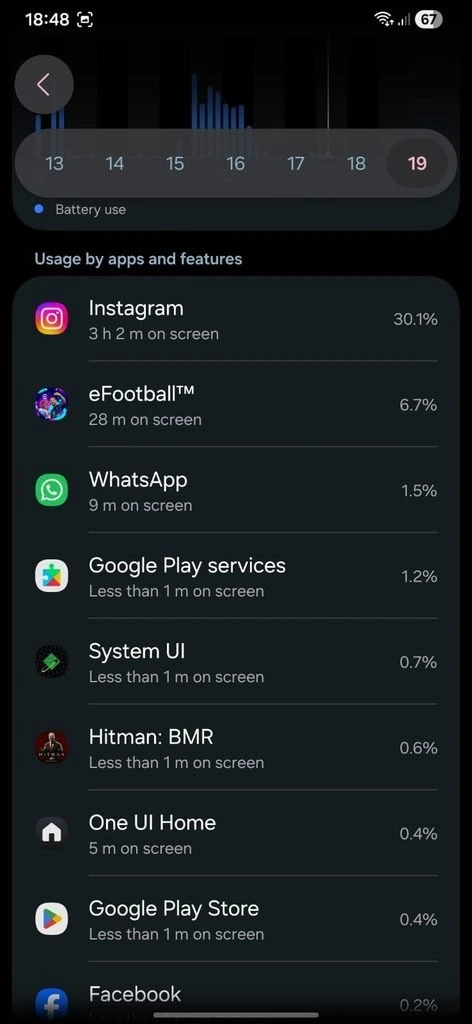
- Force-stop or close apps you rarely use
- Turn off auto-start permissions for apps that don’t need to run constantly
- Restart your phone every few days to clear out lingering background processes
Accumulated Cache and Temporary Files
Android apps store cache files so they can load faster next time you open them. This cache builds up over time, and after a limit it can start slowing things down because of accumulating unnecessary space.
How to fix this:
- Go to Settings > Apps, select an app, and tap Clear Cache
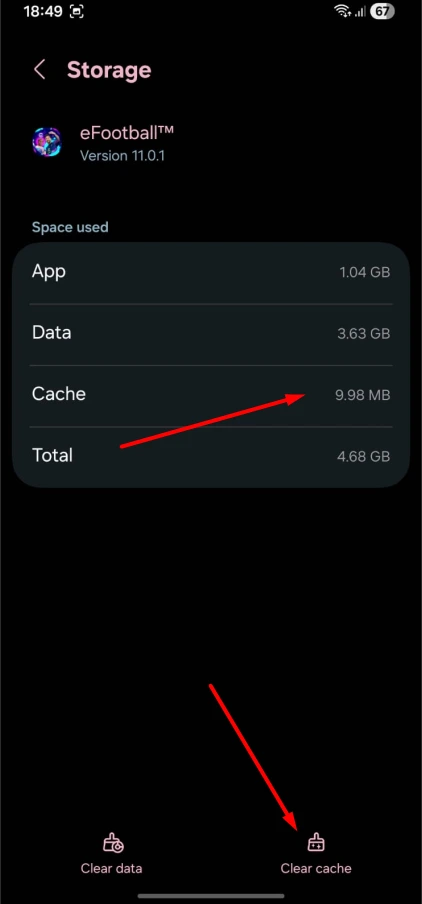
- Do this periodically for apps you use heavily, like browsers or social media
- Avoid clearing app data unless you’re trying to fully reset that app
Important thing to remember: Clearing cache is different from clearing app data. Cache just removes temporary files, while clearing data resets the app and logs you out.
Outdated Software or Pending Updates
Running an old version of Android or outdated apps can lead to compatibility issues, unpatched bugs, and code that simply isn’t optimized for today’s performance.
However, a major OS update can also sometimes slow down older hardware that wasn’t built to handle it, so this cause can work in both directions.
How to fix this:
- Check for updates under Settings > System > Software Update
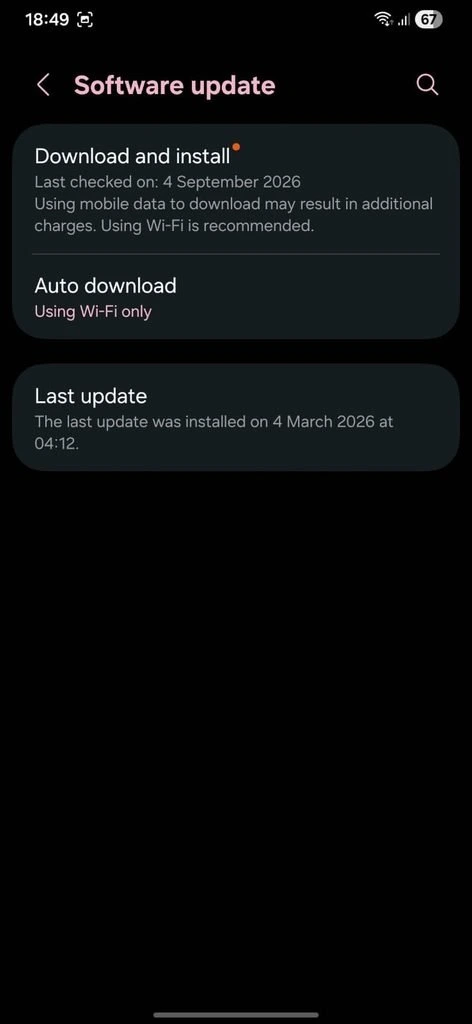
- Keep your apps updated through the Play Store
- If a recent OS update made things worse, check for a follow-up patch before assuming it’s permanent
Battery Health Has Degraded
As batteries age, phones can automatically throttle performance to protect what’s left of the battery’s lifespan. This means your phone might be intentionally running slower.
How to fix this:
- Check battery health or capacity under Settings > Battery
- Avoid letting your battery drain to 0% or sit at 100% for long periods
- Consider a battery replacement if health has dropped significantly and the phone feels sluggish
However, there are many reasons why your battery health can decline, and some Android apps are one of them. If you want to know more about such apps, you can read my guide on which Android apps are quietly draining your battery.
Too Many Widgets, Live Wallpapers, and Visual Effects
Live wallpapers, animated widgets, and heavy visual effects look nice, but they run continuously in the background and quietly affect your phone’s processing power.
How to fix this:
- Switch to a static wallpaper instead of a live one
- Remove widgets you don’t actively use
- Reduce animation speed or turn it off entirely through Developer Options
Malware or Suspicious Apps
Not every slowdown is caused by normal glitches. Sometimes malicious apps can run hidden background processes, serve unwanted ads, or quietly use up your data and battery.
How to fix this:
- Run a scan using Google Play Protect or another trusted security tool.
- Review recently installed apps and check their permissions
- Uninstall anything unfamiliar or that you don’t remember installing
- Avoid downloading apps from outside the Play Store when possible
Aging Hardware Reaching Its Limits
If all the above-mentioned causes are fixed and your phone is still getting slow, then probably the honest answer is that the phone itself is simply getting old.
Older chipsets and limited RAM are eventually struggling to keep up with newer, heavier apps and operating system versions, no matter how well you maintain the device.
How to fix this:
- Apply the fixes above to get the most out of the phone as it is
- Keep expectations realistic if the device is more than 4 to 5 years old
- Use this as a signal to start evaluating whether it’s time for a replacement, covered further down
Quick Habits to Keep Your Android Phone Running Smoothly
Beyond fixing existing issues, a few consistent habits go a long way in preventing slowdowns from creeping back in.
- Restart your phone at least once a week
- Try to keep at least 10 to 15% of your Android storage free at all times
- Be selective about app permissions, especially ones that request background access
- Treat a factory reset as a last resort, not a first response, after other fixes haven’t worked
When Should You Consider Replacing Your Phone Instead?
Not every slowdown can be fixed with software tweaks. There comes a point where troubleshooting does not work anymore. There it shows some signs that you should jump on a newer device now.
These include the phone overheating while idle, the battery draining within a few hours, apps you need no longer being supported, or repair costs getting close to the price of a new budget phone.
If you’re seeing more than one of these signs together, it’s usually a stronger signal than any single symptom on its own.
Final Words
A slow Android phone is usually caused by a mix of factors like low storage, background apps, or an aging battery, rather than one single issue.
Most of these problems can be fixed with the steps covered above, and a factory reset or replacement is only necessary in a small number of cases. At the end of the day, building a few simple habits now can help keep your phone running smoothly for much longer.
