
Close Menu
My Android News – Android News, Apps & Phone UpdatesMy Android News – Android News, Apps & Phone Updates
    Facebook X (Twitter) Instagram Threads
    Trending
    • How to Delete Google Maps Search and Location History?
    • What Is AppCloud on Android, and Can You Remove It?
    • If You’re Still on a Pixel 6, This Update Notification Might Be Your Last One
    • The Galaxy S27 Ultra Could Charge Faster Without Needing a New Charger
    • Your Phone Could Lose WhatsApp Support: Here’s Who Needs to Upgrade
    • Android 17 QPR3 Beta 1 Finally Fixes the Pixel Fingerprint Freeze
    • Samsung Hikes Galaxy S26 Prices, With the 1TB Ultra Now $200 More 
    • Pixel 10 vs Galaxy S26: Which Phone Is Truly Better?
    Facebook Instagram Pinterest YouTube LinkedIn
    My Android News – Android News, Apps & Phone UpdatesMy Android News – Android News, Apps & Phone Updates
    • Home
    • Android Apps
    • Android Gaming
    • Android How-To
    • Android News
    • Android Phones
    • Android Tips
    • Reviews
    My Android News – Android News, Apps & Phone UpdatesMy Android News – Android News, Apps & Phone Updates
    Home » How to Delete Google Maps Search and Location History?
    Android How-To

    How to Delete Google Maps Search and Location History?

    Faisal iqbalBy Faisal iqbalOctober 7, 2026No Comments5 Mins Read0 Views
    Share Facebook Twitter Pinterest LinkedIn Tumblr Email Copy Link
    Delete Google Maps Search and Location History
    Delete Google Maps Search and Location History
    Share
    Facebook Twitter LinkedIn Pinterest Email Copy Link

    Google Maps keeps a record of places you search for and, if Location History is enabled, the places you visit. This can be useful when you want to find a location you searched for earlier, but you may also want to remove this information for privacy reasons.

    You can delete your Google Maps search history and Location History separately. The process only takes a few steps, and you can choose to remove specific searches, clear activity from a certain period, or delete your saved location data completely.

    Steps to Delete Google Maps Search History on Your Phone

    You can remove individual searches from the Google Maps app on your Android phone in a few steps.

    1. Open the Google Maps app on your Samsung phone.
    2. Tap your profile picture in the top-right corner.
    profile picture in the top-right corner
    profile picture in the top-right corner
    1. Select Your data in Maps.
    Your data in Maps
    Your data in Maps
    1. Find Your search services history and tap Manage your search services history.
    Find Your search services history and tap
    Find Your search services history and tap
    1. Here, you can see all the search activity.
    2. To delete an individual search, tap the X icon next to it.
    3. To delete multiple searches, tap Delete and choose Delete today, Custom range, or Delete all time.
    Delete and choose Delete today
    Delete and choose Delete today
    1. You can explore individual tabs like Search, Maps, Shopping, etc., as well to delete data individually.
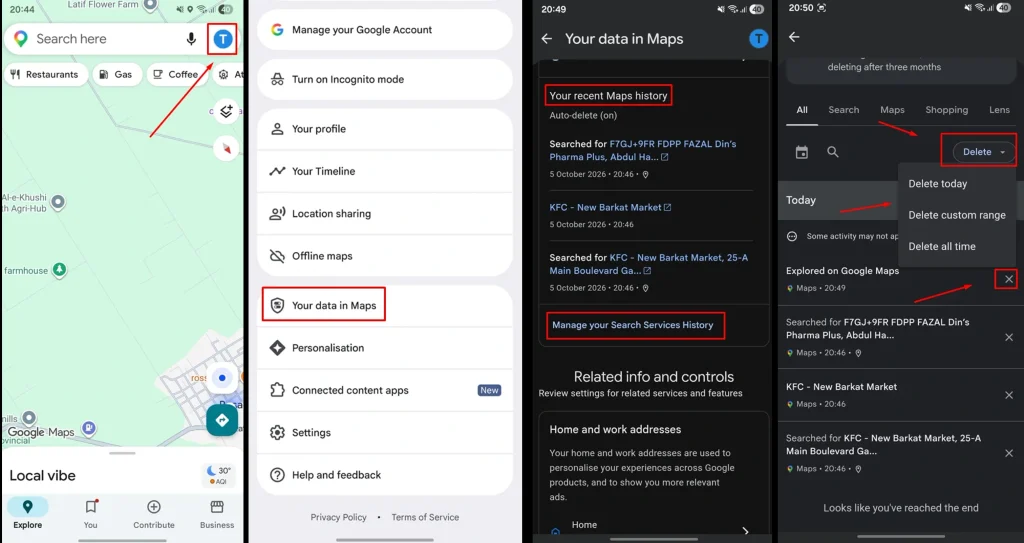
    You can repeat these steps for other searches you want to remove.

    How to Delete Google Maps Location History?

    Google Maps Location History is separate from your search activity. It can save information about places and routes you visited when the feature is turned on.

    You can delete this history from the Google Maps app.

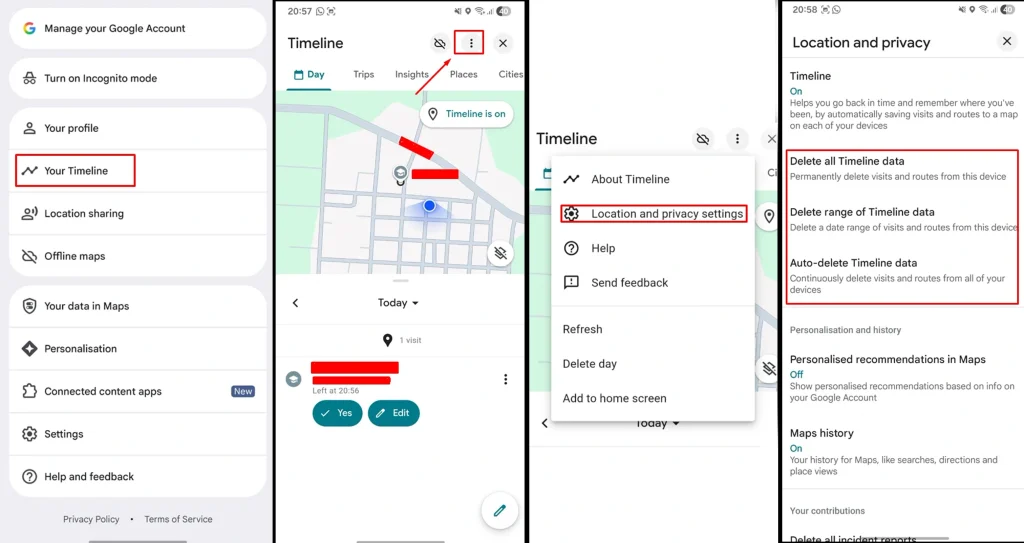
    1. Open Google Maps.
    2. Tap your profile picture.
    3. Select Your Timeline.
    Select Your Timeline
    Select Your Timeline
    1. Tap the three-dot menu in the top-right corner.
    three-dot menu
    Three-dot menu
    1. Select Location and Privacy Settings.
    Location and Privacy Settings
    Location and Privacy Settings
    1. Click on any option that you prefer (Delete all Timeline data, Delete range of Timeline data, Auto-delete Timeline data). 
    Delete all Timeline data
    Delete all Timeline data

    How to Stop Google Maps From Saving Location History?

    If you do not want Google Maps to continue saving your location history, you can change the Location History settings.

    1. Open Google Maps.
    2. Tap your profile picture.
    3. Select Your Timeline.
    4. Tap the three-dot menu.
    5. Select Location and Privacy Settings.
    Location and Privacy Settings
    Location and Privacy Settings
    1. Click Timeline.
    Click Timeline
    Click Timeline
    1. Now, select Turn off.
    select Turn off Timeline
    select Turn off Timeline
    1. Here, you can either turn off the timeline option or both turn off and delete the activity data. 
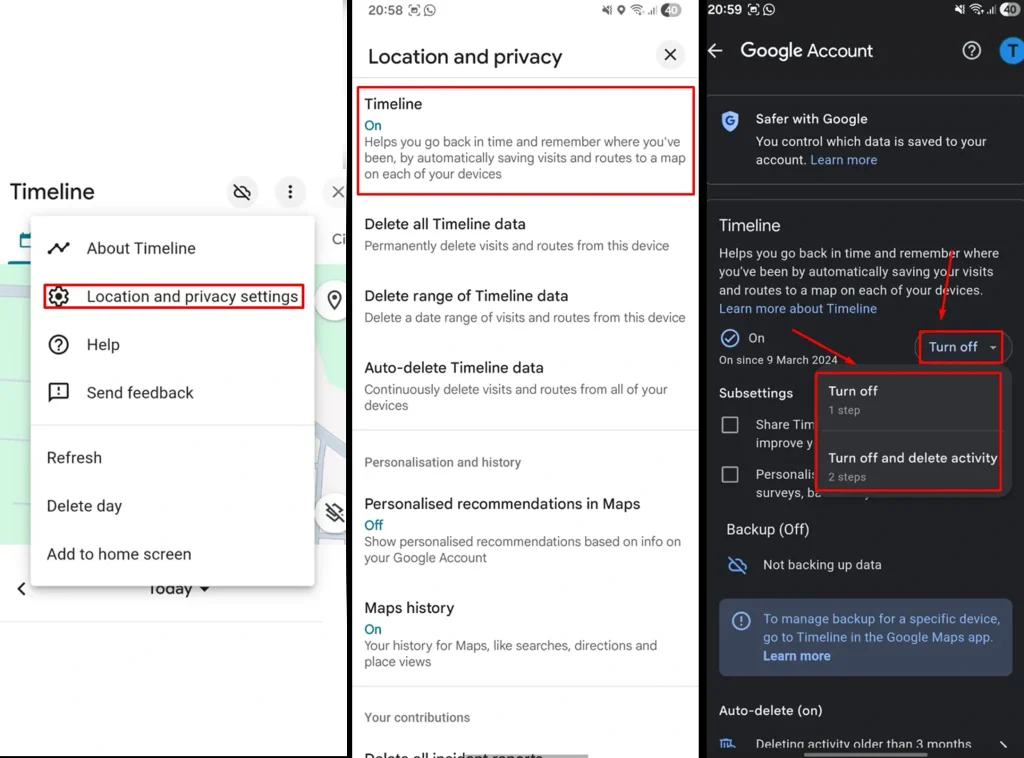
    You can also choose automatic deletion if you want older Location History to be removed automatically after a certain period.

    Why Does Google Maps Save Your Search and Location History?

    Google Maps saves search activity and Location History to make the service more useful for you. Your previous searches can make it easier to find places you looked for before, while Timeline can help you remember places you visited and routes you took.

    However, this information can also build a detailed record of your activity over time. Your search history may show the places you were interested in, while Location History can provide information about where you have been. This is why regularly reviewing and deleting old Maps activity can be useful if you want to have more control over the information stored in your account.

    Deleting Google Maps Search and Location History is Useful for Privacy Concerns

    Deleting your Google Maps search and Location History can help you have more control over the information connected to your Google Account. 

    These records can reveal the places you search for, visit, or travel to, which makes managing them important if you are concerned about your privacy. Regularly reviewing and deleting unnecessary location data can help reduce the amount of personal information stored in your account.

    It is also important to know what type of data an app can collect and store before installing it on your Android phone. 

    If you are not sure how to judge an app before installing it, read my guide on “10 Things to Check Before Installing an Android App”. It will help you check important details about an app and make a more informed decision before installing it.

    What Happens After You Delete Google Maps History?

    Deleting your Maps activity removes the selected searches or location information from your Google Account. If you delete all of your Location History, the saved Timeline information covered by the deletion will also be removed.

    Deleting your search history does not necessarily delete your Location History. These are separate types of activity, so you may need to delete both if you want to remove both your searches and saved locations.

    Final Words

    Deleting your Google Maps history is a simple way to remove searches and saved location information from your account. You can delete individual searches, clear all Maps activity, or remove Location History for a specific day or period. 

    If you want more control over what Google Maps saves, you can also turn off Location History or enable automatic deletion for older location data.

    Add as Preferred on Google Follow on Google News Follow on Flipboard
    Share. Facebook Twitter Pinterest LinkedIn Tumblr Telegram Email Copy Link
    Previous ArticleWhat Is AppCloud on Android, and Can You Remove It?
    Faisal iqbal
    • Website

    Faisal Iqbal is a technology writer with over five years of experience researching and explaining consumer technology. At My Android News, he covers Android phones, apps, reviews, and practical guides, with a focus on helping readers understand how Android products and features work in everyday use.

    Related Posts

    Your Android Phone Feels Slow? Here’s What’s Usually Behind It

    September 24, 2026

    How to Clear App Cache on Android Without Losing Data

    September 22, 2026

    How to Stop Apps Running in the Background on Android

    September 19, 2026
    Add A Comment
    Leave A Reply Cancel Reply

    • Steps to Delete Google Maps Search History on Your Phone
    • How to Delete Google Maps Location History?
    • How to Stop Google Maps From Saving Location History?
    • Why Does Google Maps Save Your Search and Location History?
    • Deleting Google Maps Search and Location History is Useful for Privacy Concerns
    • What Happens After You Delete Google Maps History?
    • Final Words


    Clickable Image

    My Android News brings you the latest Android news, practical guides, app recommendations, phone coverage, gaming coverage, features, tips, and useful insights to help you get more from your Android devices.

    We Tried It

    How to Delete Google Maps Search and Location History?

    October 7, 2026

    What Is AppCloud on Android, and Can You Remove It?

    October 7, 2026

    If You’re Still on a Pixel 6, This Update Notification Might Be Your Last One

    October 7, 2026

    Subscribe to Updates

    Get the latest Android news, practical guides, app updates, and phone coverage delivered to your inbox

    © 2026 MyAndroidNews. All rights reserved - Powered by WebTech Solutions
    • Home
    • About
    • Privacy Policy
    • Contact
    • Editorial Policy
    • Terms & Conditions

    Type above and press Enter to search. Press Esc to cancel.