
Close Menu
My Android News – Android News, Apps & Phone UpdatesMy Android News – Android News, Apps & Phone Updates
    Facebook X (Twitter) Instagram Threads
    Trending
    • Google Just Teased Android 18 App Graphics Features In Dev Event 
    • How to Get Better Gaming Performance From Your Android Phone
    • Android 17 QPR2 Beta 6 Fixes Major Pixel Bugs, But Pixel 11 Is Left Out
    • Your Android Phone Feels Slow? Here’s What’s Usually Behind It
    • GrapheneOS No Longer Means “Buy a Pixel,”   Here’s the Phone That Changes That
    • Stable One UI 9 Hits T-Mobile Samsung Galaxy S26 Ultra in the US
    • How to Clear App Cache on Android Without Losing Data
    • Android App Keeps Crashing? Here’s How to Fix It
    Facebook Instagram Pinterest YouTube LinkedIn
    My Android News – Android News, Apps & Phone UpdatesMy Android News – Android News, Apps & Phone Updates
    • Home
    • Android Apps
    • Android Gaming
    • Android How-To
    • Android News
    • Android Phones
    • Android Tips
    • Reviews
    My Android News – Android News, Apps & Phone UpdatesMy Android News – Android News, Apps & Phone Updates
    Home » Google Just Teased Android 18 App Graphics Features In Dev Event 
    Android News

    Google Just Teased Android 18 App Graphics Features In Dev Event 

    My Android News DeskBy My Android News DeskSeptember 26, 2026No Comments2 Mins Read2 Views
    Share Facebook Twitter Pinterest LinkedIn Tumblr Email Copy Link
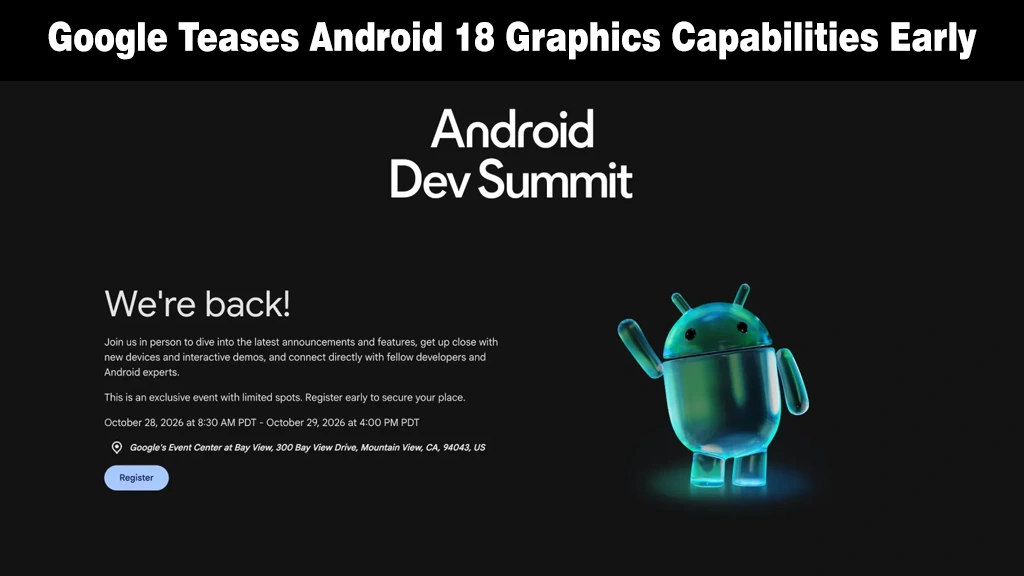
    Translucent green Android mascot figure waving next to Android Dev Summit event registration text.
    Google announces the return of Android Dev Summit, teasing early Android 18 graphics capabilities.
    Share
    Facebook Twitter LinkedIn Pinterest Email Copy Link

    Android 18 doesn’t officially exist yet; no beta, no preview, not even a name beyond a number. But Google just gave us the very first real signal of what it’s building, and it’s an exciting one for anyone who cares about how their Android phone looks and feels day to day.

    Buried in a Developer Conference, But Aimed at You

    The reveal comes as Google resurrects the Android Dev Summit, its developer-focused conference that hasn’t happened since 2022, as 9to5Google details. 

    The event returns October 28-29 at Google’s Mountain View headquarters, with a satellite “Extended” event in London, featuring a keynote from Android leadership and sessions across four tracks: AI experiences, Android XR, apps foundation, and tools and performance.

    Tucked into that agenda is the very first mention of Android 18, tied to a session titled “Elevate your apps with the latest graphics features in Jetpack Compose and Android 18.” 

    Google’s own description promises to help developers turn app UI “from “it works” to “it’s a work of art,” name-checking new effects like mesh gradients and progressive blurs.

    Why This Should Make You Say Wow

    Here’s the part that matters if you’re not a developer: Google explicitly says these visual effects arrive with better graphics performance, “without sacrificing battery life or frame rates.” 

    Fancier animations and smoother visual polish across your favorite apps, without your phone running hotter or your battery draining faster, is exactly the kind of upgrade that’s easy to feel and hard to dislike.

    Beyond graphics, Google’s Android Dev Summit sessions hint that Android is evolving into an “intelligence system.” 

    Here, Gemini orchestrates multi-app tasks, while the Android Context Engine powers proactive experiences, a system that anticipates user needs before being asked.

    Don’t Expect It Anytime Soon

    Worth tempering expectations: Google now uses rolling Canary builds instead of traditional developer previews. For context, Android 16 testing did not begin until November, making an Android 18 preview in October unusually early. 

    Still, for a platform that can feel visually stagnant between big redesigns, a confirmed focus on how apps actually look, without a battery-life tax, is a promising sign for long-term longevity. 

    Source: Google brings back Android Dev Summit with Android 18 

    Add as Preferred on Google Follow on Google News Follow on Flipboard
    Share. Facebook Twitter Pinterest LinkedIn Tumblr Telegram Email Copy Link
    Previous ArticleHow to Get Better Gaming Performance From Your Android Phone
    My Android News Desk

      My Android News Desk is the editorial team behind My Android News, covering the latest Android news, app and phone updates, new features, and developments across the Android ecosystem. The team follows official announcements, developer updates, and reliable sources to provide timely and useful information for Android users.

      Related Posts

      Android 17 QPR2 Beta 6 Fixes Major Pixel Bugs, But Pixel 11 Is Left Out

      September 25, 2026

      GrapheneOS No Longer Means “Buy a Pixel,”   Here’s the Phone That Changes That

      September 24, 2026

      Stable One UI 9 Hits T-Mobile Samsung Galaxy S26 Ultra in the US

      September 23, 2026
      Add A Comment
      Leave A Reply Cancel Reply

      • Buried in a Developer Conference, But Aimed at You
      • Why This Should Make You Say Wow
      • Don’t Expect It Anytime Soon


      Clickable Image

      My Android News brings you the latest Android news, practical guides, app recommendations, phone coverage, gaming coverage, features, tips, and useful insights to help you get more from your Android devices.

      We Tried It

      Google Just Teased Android 18 App Graphics Features In Dev Event 

      September 26, 2026

      How to Get Better Gaming Performance From Your Android Phone

      September 25, 2026

      Android 17 QPR2 Beta 6 Fixes Major Pixel Bugs, But Pixel 11 Is Left Out

      September 25, 2026

      Subscribe to Updates

      Get the latest Android news, practical guides, app updates, and phone coverage delivered to your inbox

      © 2026 MyAndroidNews. All rights reserved - Powered by WebTech Solutions
      • Home
      • About
      • Privacy Policy
      • Contact
      • Editorial Policy
      • Terms & Conditions

      Type above and press Enter to search. Press Esc to cancel.