


Juggling errands, work deadlines, and personal reminders on a single phone can get messy fast. A good task management app turns that chaos into something you can actually control, without adding extra work to your day.
Whether you need a simple checklist or a full planning system, there is an Android app built for it. I’ve found that the best choice often comes down to how much structure you actually need.
Let’s uncover the 10 best options available right now, along with what each one does well and where it falls short.
A Quick Comparison of Best Android Apps for Managing Everyday Tasks
| App | Best For | Free Tier & Standout Feature |
| Google Tasks | Gmail and Calendar users | Fully free. Deep Google integration |
| Todoist | All-around task management | Generous free plan. Natural language quick-add |
| Invoice Creator | Simple invoice creation | Freemium. Detailed and quick invoice options |
| TickTick | Tasks, calendar, and habits combined | Generous free plan. Built-in Pomodoro timer |
| Microsoft To Do | Zero-cost planning | Completely free. My Day focus view |
| Any.do | Voice entry and daily planning | Limited free plan. Voice-to-task creation |
| Habitica | Motivation and gamified habits | Free with in-app purchases. RPG-style rewards system |
| Tasks.org | Privacy-focused users | Fully free, open-source. No ads or tracking |
| Notion | Combining notes and tasks | Generous free plan. All-in-one workspace |
| Google Keep | Quick lightweight lists | Fully free. Fast voice and text capture |
1. Google Tasks
Google Tasks is a lightweight, no-nonsense app that lives inside Gmail and Google Calendar. It’s built for people who want their to-do list to blend into tools they already use daily, rather than learning a new system.
There’s nothing flashy here. You add a task, set a due date, and it shows up right alongside your emails and calendar events. It’s a solid pick if you want something simple that just works without extra setup or clutter.
Major Features
- Deep integration with Gmail and Google Calendar
- Subtasks and notes for each task
- Clean, minimal interface
- Free with any Google account
Limitations
- No habit tracking or advanced planning tools
- Limited customization options
- Lacks natural language input for quick task creation
Best for: People who already live inside Gmail and Calendar and want their tasks in the same place.
2. Todoist
Todoist is widely considered one of the most reliable task managers on Android, balancing simplicity with genuinely useful features.
You can type a task in plain language, like “submit report Friday at 5 pm,” and it automatically sets the date and time for you.
It supports projects, labels, and priority levels, making it flexible enough for both personal errands and work projects. The free version covers most everyday needs, and the paid tier adds more advanced project features for heavier users.
Major Features
- Natural language quick-add for tasks
- Project and label-based organization
- Priority levels and recurring due dates
- Cross-platform sync across all devices
Limitations
- Advanced features are locked behind a paid plan
- No built-in habit tracker
- Can feel text-heavy for users who prefer visual boards
Best for: Users who want a dependable all-around task manager without a steep learning curve.
3. Invoice Creator by WebTechSolutions
Invoice Creator by WebTechSolutions is a simple Android app for creating and managing invoices without a complicated setup.
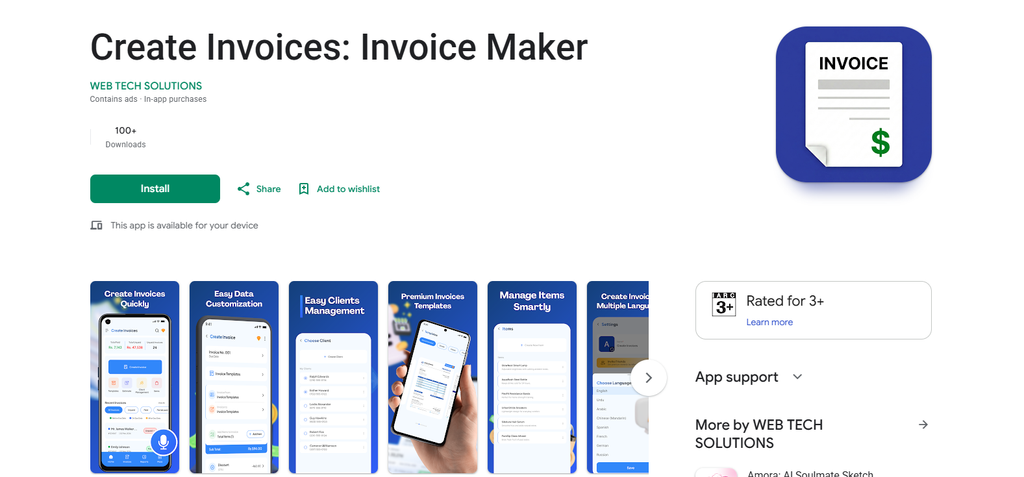
You can create detailed invoices with templates, client information, items, taxes, and signature details, or use the quick invoice option when you only need a basic bill. The app keeps the process straightforward, making it useful for freelancers, small businesses, and anyone who needs to create invoices on the go.
Major Features
- Detailed invoices with customizable templates
- Tax and signature details
- Quick invoice option for simple bills
- Simple, user-friendly interface
Limitations
- Focused mainly on invoicing
- Lacks advanced accounting tools
- Not ideal for complex workflows
Best for: Freelancers, small-business owners, and anyone who needs a simple way to create and manage invoices from their Android phone.
4. TickTick
TickTick combines a to-do list, calendar, and habit tracker into one app, making it a favorite for people who want everything managed in a single place.
It includes a built-in Pomodoro timer for focused work sessions and smart recognition that can turn a typed sentence into a scheduled task automatically. The free plan is generous, covering reminders, subtasks, and tags, which is more than many competitors offer at no cost.
Major Features
- Built-in calendar and habit tracker
- Pomodoro timer for focus sessions
- Smart recognition for quick task entry
- Recurring tasks for bills and routines
Limitations
- The interface feels less polished than some competitors
- Habit tracking may feel like overkill for simple users
- Some features require a subscription for full access
Best for: People who want tasks, calendar, and habits combined in one app.
5. Microsoft To Do
Microsoft To Do is a clean, free task manager built around a “My Day” feature that helps you focus on what matters today instead of an overwhelming master list.
It syncs well with Outlook, making it a natural fit for anyone already using Microsoft’s ecosystem for work or school. The app avoids unnecessary complexity, sticking to lists, due dates, and reminders without piling on extra features you won’t use.
Major Features
- My Day view for daily focus
- Outlook and Microsoft 365 integration
- List sharing for shared responsibilities
- Completely free with no paywalled features
Limitations
- Fewer customization options than competitors
- No built-in habit or time tracking
- Less useful for those outside the Microsoft ecosystem
Best for: Anyone who wants a completely free planner with zero paywalls.
6. Any.do
Any.do stands out for its voice entry feature, letting you add tasks by simply speaking instead of typing. It also includes a daily planner mode that walks you through your tasks each morning, helping you start the day with a clear plan.
The app supports shared lists, making it useful for coordinating tasks with family or roommates. It strikes a balance between simplicity and useful planning tools.
Major Features
- Voice-to-task entry
- Daily planner mode each morning
- Shared lists for family or team tasks
- Calendar view alongside task lists
Limitations
- Some planning features require a premium subscription
- Interface can feel busy for minimalists
- Occasional sync delays reported by users
Best for: People who prefer speaking tasks instead of typing them out.
7. Habitica
Habitica takes a different approach by turning your task list into a role-playing game. Completing tasks earns you points, levels up your character, and unlocks rewards, while skipped tasks can cost you in-game health.
It’s designed for people who struggle with motivation and need a playful push to stay consistent. It works especially well for habit building alongside regular task management.
Major Features
- Gamified rewards for completed tasks
- Character progression and in-game items
- Party system for accountability with friends
- Habit, daily, and to-do tracking in one app
Limitations
- Game mechanics can feel distracting for some users
- Less suited for serious project management
- Learning curve for understanding the game system
Best for: People who need a playful, motivation-driven way to stay on top of tasks.
8. Tasks.org
Tasks.org is an open-source task manager built with privacy in mind. It doesn’t rely on ads or data collection, and it gives users full control over how their information syncs, including options for self-hosting.
Despite being open-source, it still offers a polished experience with recurring tasks, subtasks, and reminders that rival paid alternatives.
Major Features
- Open-source with no ads or tracking
- Recurring tasks and subtasks
- Flexible sync options, including self-hosting
- Customizable list colors and filters
Limitations
- Smaller community and support base than mainstream apps
- The interface feels less modern than the top competitors
- Some advanced sync setups require technical knowledge
Best for: Privacy-conscious users who want full control over their data.
9. Notion
Notion goes beyond a simple task list, combining notes, databases, and tasks into one flexible workspace.
It’s ideal for people who want to manage personal projects alongside their daily to-dos, rather than juggling separate apps. The learning curve is steeper than a basic list app, but the payoff is a fully customizable system that can be built around any workflow.
Major Features
- Combines notes, tasks, and databases in one app
- Highly customizable templates and layouts
- Collaboration features for shared projects
- Works across mobile, desktop, and web
Limitations
- Steeper learning curve than simple to-do apps
- Can feel like overkill for basic daily tasks
- Requires more setup time before it feels useful
Best for: People who want tasks integrated into a broader personal organization system.
10. Google Keep
Google Keep is less a task manager and more a fast, flexible notes app that doubles as a checklist tool. It’s built for quick capture, jotting down a shopping list or a reminder in seconds using text, voice, or even images.
It lacks the structure of a dedicated task app, but its speed and simplicity make it a favorite for lightweight daily use.
Major Features
- Quick checklist and note creation
- Voice- and image-based notes
- Color-coded organization for easy scanning
- Syncs instantly across Google account devices
Limitations
- No due dates or recurring task support
- Not built for structured project management
- Lacks priority levels or task categorization
Best for: Quick, lightweight lists and reminders without extra structure.
11. TeuxDeux
TeuxDeux offers a clean, calendar-style layout that lays your tasks out day by day, similar to a paper planner. It avoids the feature overload found in many productivity apps, focusing purely on helping you see your week at a glance.
This makes it especially appealing for people who find complex apps overwhelming and prefer a visual, uncluttered approach to planning.
Major Features
- Calendar-style weekly task layout
- Simple drag-and-drop task rescheduling
- Minimalist, distraction-free design
- Recurring task support for routines
Limitations
- Missing advanced features like tags or priorities
- Limited free plan compared to competitors
- Not ideal for complex, multi-project workflows
Best for: People who want a clean, visual weekly planner without extra features.
How to Choose the Right App for Your Workflow
The right app depends less on features and more on how you naturally think about tasks. If you want something that blends into tools you already use, Google Tasks or Microsoft To Do makes sense.
If you need structure and depth, Todoist or TickTick will serve you better. If motivation is your real challenge, Habitica adds a game layer that keeps you accountable. And if you just need quick, low-effort lists, Google Keep gets the job done without any setup.
Common Mistakes That Make People Abandon Task Apps
Most people don’t quit a task app because it’s bad. They quit because of how they use it.
- Overcomplicating the setup: Adding too many lists, tags, and categories before you’ve even used the app for a week
- Ignoring notifications: Turning off reminders because they feel repetitive, then forgetting tasks entirely
- Ignoring the daily review: Not spending two minutes a day checking and updating the list, so it slowly becomes outdated
- Switching apps too often: Jumping to a new app every time the current one feels boring, instead of sticking with one long enough to build a habit
Final Thoughts on the Best Android Apps for Everyday Task Management
The best Android task app is the one that fits naturally into your daily routine. Google Tasks and Microsoft To Do are great for simple planning, while Todoist and TickTick offer more structure.
Habitica adds motivation through gamification, and Google Keep keeps things quick and simple. Instead of chasing every feature, pick one that matches your needs and stick with it long enough to build a useful habit.
What Else Should You Know?
Todoist and TickTick are the top picks for most people, offering reliable reminders, quick task entry, and easy syncing across devices. The best choice ultimately depends on whether you want a simple list or a more feature-packed planner with habits and calendar built in.
Yes, apps like Google Tasks, Microsoft To Do, and Tasks.org are completely free with no paywalled core features. They cover the essentials most people need for daily task management.
A to-do app is usually a simple checklist, while a task manager adds structure like due dates, priorities, and recurring tasks. Apps like Todoist and TickTick fall into the task manager category.
Most apps on this list, including Todoist, TickTick, and Any.do, sync across Android, iOS, and desktop. A few, like Tasks.org, offer flexible sync options including self-hosting.
No, most apps on this list offer a free tier that covers everyday task management needs. Paid plans mainly add extras like advanced project views or unlimited integrations, which casual users rarely need.

4 Comments
Pingback: What to Check Before Installing an Android App
Pingback: Which Android Apps Are Quietly Draining Your Battery?
Pingback: Your Android Phone Feels Slow? Here’s What’s Usually Behind It
Pingback: How to Turn On Dark Mode in Google Maps on Android